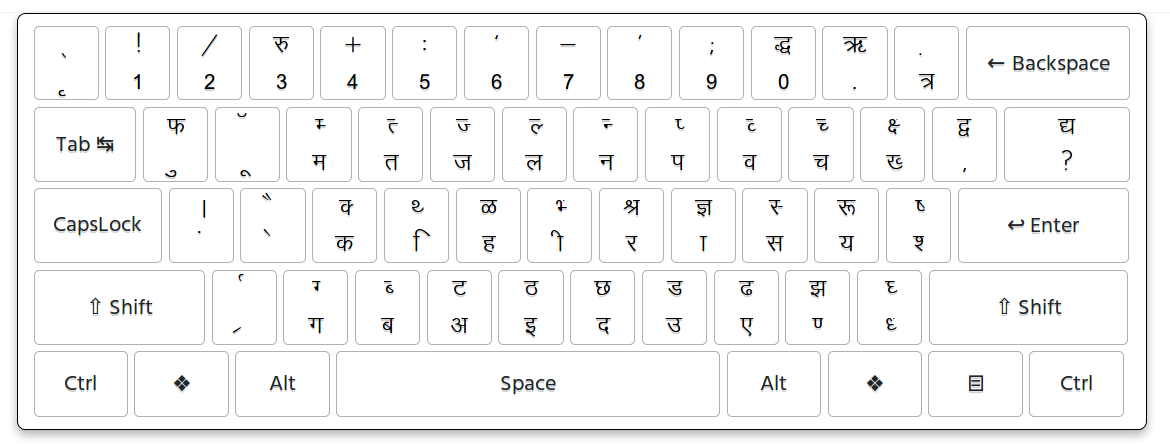
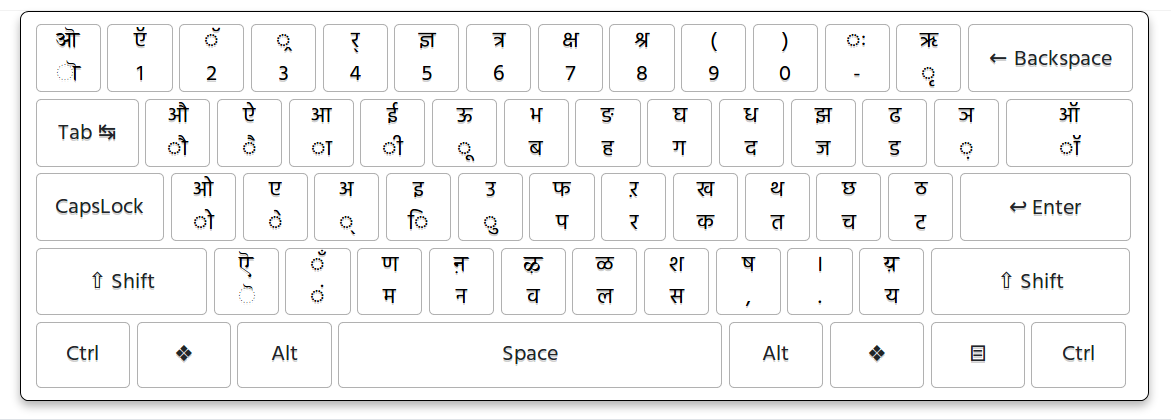
Krutidev to Mangal Converter
Convert Krutidev to Mangal online with our free Hindi text converter. Convert old Krutidev Hindi text into Unicode-compatible Hindi text that can be displayed using Mangal and other Unicode Devanagari fonts. Use the converted text in Microsoft Word, Excel, Google Docs, websites, online forms, email, mobile devices, and other modern applications.
What Is Krutidev to Mangal Conversion?
Krutidev to Mangal conversion means converting Hindi text written using the legacy Krutidev character mapping into Unicode Hindi text that can be displayed using the Mangal font or another Unicode-compatible Devanagari font.
Krutidev has been widely used for Hindi typing in India, especially in government offices, typing institutes, printing businesses, competitive examinations, data entry work, and older computer systems. As a result, many older Hindi documents and records still contain text created using Krutidev.
The challenge is that Krutidev uses a legacy font-based character mapping. Text created in this format may not behave like standard Unicode text when it is copied into modern applications, websites, mobile phones, or online forms.
Unicode provides a standardized way to represent Hindi characters. Once Krutidev text has been converted to Unicode, the resulting Hindi text can be displayed using Unicode Devanagari fonts such as Mangal.
This makes converted Hindi text easier to copy, edit, search, publish, and reuse across modern digital applications.
Krutidev to Mangal Converter Online
Many Hindi users search for a Krutidev to Mangal converter when they have old Hindi text written in Krutidev and want to use it in a modern application with the Mangal font.
Technically, Krutidev and Mangal are different things. Krutidev is a legacy Hindi typing and character-mapping system, while Mangal is a Unicode-based Devanagari font. The conversion process changes the underlying Krutidev text into Unicode Hindi text; Mangal can then be used to display that Unicode text.
This distinction is important because changing the font alone does not convert legacy Krutidev text into Unicode. The text needs to be converted first and then displayed using a suitable Unicode Devanagari font such as Mangal.
After conversion, the Unicode Hindi text can be used in Microsoft Word, Excel, Google Docs, websites, online forms, email, and many other applications.
- Microsoft Word
- Microsoft Excel
- Microsoft PowerPoint
- Google Docs
- Google Sheets
- Websites and blogs
- Online government forms
- PDF documents
- Social media
- Mobile applications
Why Convert Krutidev Text to Unicode for Mangal?
There are several reasons to convert old Krutidev Hindi text into Unicode before using it with Mangal. Unicode text is easier to move between modern applications because the characters are represented using standardized encoding rather than depending on a legacy font mapping.
Use Mangal Font in Modern Applications
Mangal is a Unicode Devanagari font commonly used for displaying Hindi text in Windows and Microsoft applications. After Krutidev text has been converted to Unicode, you can select Mangal as the display font where supported.
Better Compatibility
Unicode Hindi text is designed for modern digital systems. You can copy the converted text between compatible applications without depending on the original Krutidev font being installed.
Use Hindi Text on Mobile Phones
Modern Android and iPhone devices support Unicode Devanagari text. Converting old Krutidev content to Unicode makes it much easier to use Hindi text on mobile devices without relying on a legacy Krutidev font.
Use Hindi in Government Forms
Many online services and government portals use Unicode for Indian-language text. If your existing information is stored in Krutidev, converting it to Unicode can make it suitable for systems that expect standard Hindi text.
Easy Copy and Paste
Unicode Hindi can generally be copied from Word, Google Docs, websites, email, and other compatible applications and pasted into another Unicode-supported application.
Searchable Hindi Content
Unicode text is better suited to modern search and text processing systems. This is especially useful when converting old Hindi content for websites, digital documents, databases, or online publishing.
Preserve Older Hindi Documents
Converting important Krutidev documents to Unicode can help preserve the underlying Hindi text in a more modern and reusable format. This can be useful when updating older records or migrating content to newer software.
Works with Different Unicode Fonts
Once Krutidev text has been converted to Unicode, you are not restricted to Mangal. The same Unicode Hindi text can generally be displayed using other Unicode-compatible Devanagari fonts as well.
How to Convert Krutidev to Mangal Online
Converting Krutidev text for use with Mangal is simple. You do not need to manually replace individual Hindi characters. Copy the original Krutidev text, convert it to Unicode, and then use a Unicode-compatible font such as Mangal to display the result.
Step 1: Copy Your Krutidev Text
Open the document containing your old Hindi text. Select the Krutidev text you want to convert and copy it. You can copy text from an older Word document, text file, website, or another application where Krutidev is being used.
Step 2: Paste the Text into the Converter
Paste your Krutidev text into the converter input area. Make sure the original content was actually typed using Krutidev. Text created with another legacy Hindi font may require a different conversion method.
Step 3: Convert the Krutidev Text
Click the Convert button. The converter processes the Krutidev character mapping and generates the corresponding Unicode Hindi text.
Step 4: Review the Unicode Hindi Output
Check the converted result carefully. Pay particular attention to names, numbers, punctuation, special characters, and unusual Hindi combinations.
Step 5: Select Mangal Font
Copy the converted Unicode Hindi text into an application such as Microsoft Word or another program that supports Mangal. Select Mangal as the font when you want the text to appear using the Mangal typeface.
Step 6: Copy, Save, or Use Your Text
The converted Unicode Hindi text can be copied into Word, Excel, Google Docs, websites, online forms, email, and other Unicode-compatible applications. Save the converted content if you need to reuse it later.
Kruti Dev to Mangal Hindi Font Converter
People use several different phrases when searching for a tool that converts old Hindi text for use with Mangal. Some users search for Krutidev to Mangal, while others use Kruti Dev to Unicode, Krutidev to Unicode Hindi, or Hindi font converter.
These searches usually describe a similar requirement: take Hindi text written using a legacy Krutidev character mapping and convert it into Unicode Hindi text that can be used with modern applications and Unicode Devanagari fonts such as Mangal.
Common searches:
Who Can Use a Krutidev to Mangal Converter?
Government Employees
Government departments and offices have accumulated large amounts of Hindi documentation over the years. Employees may need to convert older Krutidev content before entering it into newer systems, forms, databases, or documents.
Hindi Typists
Hindi typing professionals often work with documents created using different typing systems. Converting legacy Krutidev text to Unicode makes it easier to use the content in modern applications.
Students
Students may receive old Hindi notes, assignments, question papers, or study material created using Krutidev. Converting the text to Unicode makes it easier to edit, reuse, and submit in modern applications.
Data Entry Operators
Data entry professionals may receive Hindi information from older documents. Converting the content to Unicode can help standardize text before entering it into modern databases or online systems.
Hindi Writers and Content Creators
Writers and publishers may have older Hindi articles, documents, or notes stored in Krutidev. Converting those documents to Unicode makes the content easier to publish on websites, blogs, and digital platforms.
Office and Administrative Staff
Office staff can use Unicode conversion when older Hindi records need to be updated, copied into new documents, or transferred into modern software.
Advantages of Using an Online Krutidev Converter
- No manual character replacement is required.
- Works directly in a modern web browser.
- Useful for converting older Hindi text.
- Converted text can be displayed using Mangal.
- Unicode Hindi can be copied and pasted between compatible applications.
- Useful for Microsoft Word and Excel.
- Useful for Hindi government forms and online services.
- Can be used from desktop and mobile browsers.
- Helps modernize older Hindi documents.
- Useful for Hindi website and content publishing.
- Makes legacy Hindi text easier to reuse.
Krutidev vs Mangal: What Is the Difference?
Krutidev and Mangal are not the same type of technology. Krutidev is associated with a legacy Hindi typing and font-based character mapping, while Mangal is a Unicode-based Devanagari font.
The difference is important when converting old Hindi text. Simply selecting Mangal as the font for legacy Krutidev text does not necessarily convert the underlying characters. The text needs to be converted into Unicode first.
After the conversion, the resulting Unicode Hindi text can be displayed using Mangal or another suitable Unicode Devanagari font. This makes the text much more portable across modern applications and devices.
Can Converted Text Be Used in Microsoft Word and Excel?
Yes. Unicode Hindi text can generally be copied and pasted into Microsoft Word and Microsoft Excel. It can also be used in Google Docs, Google Sheets, email, websites, content management systems, and other applications that support Devanagari text.
If you want the converted text to appear in the Mangal typeface, select Mangal as the font after pasting the Unicode Hindi text into an application that supports the font.
If Mangal is not available on a particular device, another Unicode-compatible Devanagari font can usually be used to display the same Unicode text.
Can I Use the Converter on a Mobile Phone?
Yes. An online Krutidev converter can be used from a modern Android or iPhone browser. Copy the Krutidev text from a supported source, paste it into the converter, convert it, and copy the resulting Unicode Hindi text.
This is useful when you need to convert Hindi text while working away from a desktop computer or when you do not want to install additional software.
Krutidev to Mangal for Government Documents
Older government documents and office records may contain Hindi text created using legacy typing systems. When this information needs to be entered into a modern online form or transferred into a new document, Unicode conversion can make the text easier to reuse.
After conversion, the Unicode Hindi output can be displayed using Mangal or another compatible Devanagari font. However, individual government portals may have their own input requirements, so always follow the instructions provided by the relevant department or website.
Tips for Getting Accurate Conversion Results
- Make sure the original text is actually typed using Krutidev.
- Copy the complete text before starting the conversion.
- Do not manually modify the Krutidev characters before conversion.
- Review the converted Unicode output carefully.
- Check names, numbers, punctuation, and special characters.
- Pay attention to complex Hindi combinations.
- For official documents, proofread the converted content before submitting it.
- Use Mangal or another Unicode-compatible Devanagari font to display the result.
- Keep the original Krutidev document until you have verified the conversion.
- For large documents, convert and review the content in manageable sections.
What If the Converted Text Looks Incorrect?
Incorrect output can occur when the original content was not created using Krutidev, when the source text is corrupted, or when the document contains unusual legacy characters or combinations.
Different legacy Hindi fonts can use different character mappings. Therefore, text created with another font may not convert correctly using a Krutidev conversion method.
If the output contains unexpected characters, compare it with the original document and check whether the source was actually typed in Krutidev. Important official or professional documents should always be proofread after conversion.
Is Krutidev to Mangal Conversion the Same as Changing the Font?
No. Changing the font and converting the text are two different operations. A legacy Krutidev document may depend on a particular character mapping, so simply selecting Mangal may produce incorrect characters.
The correct workflow is to convert the legacy Krutidev text into Unicode first. Once the text is Unicode, Mangal can be selected as the display font in applications that support it.
This is why a Krutidev conversion tool is useful when migrating old Hindi content into modern Unicode-based workflows.
Frequently Asked Questions About Krutidev to Unicode
1. What is Krutidev?
Krutidev is a legacy Hindi typing and font system that has been widely used in India for Hindi typing, government work, printing, competitive examinations, and data entry. Many older Hindi documents still contain text created using Krutidev.
2. What is Mangal font?
Mangal is a Unicode-based Devanagari font used to display Hindi and other Indic scripts. It is commonly available in Microsoft Windows and Microsoft Office environments.
3. What is a Krutidev to Mangal converter?
A Krutidev to Mangal converter converts Hindi text written using the legacy Krutidev character mapping into Unicode-compatible Hindi text. The resulting Unicode text can then be displayed using Mangal or another Unicode Devanagari font.
4. Is Krutidev to Mangal the same as Krutidev to Unicode?
They are closely related but technically different. Unicode is a character encoding standard, while Mangal is a Unicode-based Devanagari font. Converting Krutidev text to Unicode allows it to be displayed using Mangal.
5. Can I convert Krutidev to Mangal online?
Yes. You can paste Krutidev Hindi text into an online converter, convert it to Unicode Hindi text, and then use Mangal as the display font in a compatible application.
6. Can I use the converted text in Microsoft Word?
Yes. Unicode Hindi text can generally be copied into Microsoft Word. If Mangal is available, you can select it as the font to display the converted Hindi text.
7. Can I use the converted text in Excel?
Yes. Unicode Hindi text can generally be pasted into Microsoft Excel. You can select Mangal or another Unicode-compatible Devanagari font when supported by the application.
8. Can I use the converter on a mobile phone?
Yes. The online conversion process can be used from modern Android and iOS browsers. You can paste Krutidev text, convert it, and copy the Unicode Hindi output.
9. Can I use converted Hindi text in government forms?
Unicode Hindi is commonly used by modern digital systems and online services. However, requirements can differ between government portals, so follow the instructions provided by the specific website or department.
10. Does conversion change the meaning of the Hindi text?
The purpose of conversion is to change the underlying character representation from the Krutidev mapping to Unicode. It is not a translation process and does not intentionally change the meaning of the Hindi content.
11. Is Krutidev conversion always 100% accurate?
Many commonly used Krutidev characters and combinations can be converted successfully, but unusual symbols, complex combinations, corrupted source text, or text created using another legacy Hindi font may require manual correction. Always review important converted text.
12. Why does my converted Hindi text look incorrect?
Incorrect output can occur when the original text was not created using Krutidev, the source text is corrupted, or it contains unsupported legacy characters. Check the original font and carefully review the converted output.
13. Can I convert a large amount of Krutidev text?
The amount of text you can convert depends on the converter and browser. For very large documents, converting the content in smaller sections can make the process easier and allow you to review the output more carefully.
14. Can Unicode text use fonts other than Mangal?
Yes. Unicode is not tied to a single font. After converting Krutidev text to Unicode, the Hindi text can generally be displayed using Mangal or another Unicode-compatible Devanagari font.
Convert Krutidev to Mangal Online
Convert old Krutidev Hindi text into Unicode Hindi text that can be displayed using the Mangal font. Krutidev is a legacy Hindi typing system commonly found in older documents, government records, typing work, and data entry files, while Mangal is a Unicode-based Devanagari font used by many modern applications. Converting your Krutidev text to Unicode makes it easier to copy, edit, search, and use across Microsoft Word, Excel, websites, online forms, mobile devices, and other modern applications. Whether you are a Hindi typist, student, government employee, data entry operator, writer, or working with an old Hindi document, this converter helps you prepare legacy Hindi text for use with Mangal and other Unicode-compatible Devanagari fonts.